Category Archives: Windows

Adobe Flash Player 11.7.700.224 Released for Microsoft Windows and Apple Mac OS X

Adobe Flash Player 11.7.700.224 Released for Microsoft Windows and Apple Mac OS X

Security Enhancements

  • This update resolves a memory corruption vulnerability that could lead to code execution (CVE-2013-3343)

You can download Adobe Flash Player 11.7.700.224 from http://www.adobe.com

Protecting against Ransomware Virus Variants

The Ransomware virus variants have been coming thick and fast lately, they are all slightly different but follow the same trend.

This virus usually works by exploiting vulnerabilities in Java or Flash Player

It is highly recommended that you follow these best practices

  • Remove old versions of the Java Runtime Environment
  • Remove old versions of the Adobe Flash Player
  • Install the latest Java Runtime Environment from http://java.sun.com (Java SE 7 Update 25)
  • Install the latest Adobe Flash Player from http://get.adobe.com/flashplayer (Adobe Flash Player 11.7.700.224)
  • Ensure that you are running a current anti-virus package and that the virus definitions/signatures are up to date
  • Update all other add ins, you can use www.mozilla.org/en-GB/plugincheck to verify which common add ins require updating
  • Utilise a Firewall or UTM Appliance with IPS (Intrusion Prevention System)
  • Submit malicious files and URLs to https://www.virustotal.com this helps improve detections and raises awareness of the impact malware is having around the world

If your Firewall or UTM Appliance provides IPS then ensure that the Signatures protect against the following exploits

CVE-2012-1723
CVE-2013-0431
CVE-2013-0422
CVE-2013-1493
CVE-2013-0634
CVE-2013-2423

Slow Network or Internet Download and Read Speeds using Intel Network Adapter

You may find that Network and/or Internet speeds are very slow when using an Intel Network Adapter.

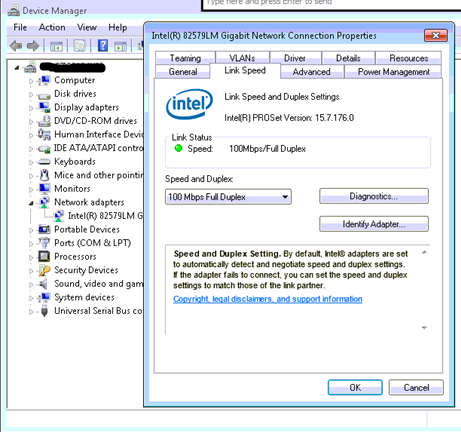
This appears to be an issue with the Speed and Duplex settings, after a Driver update or installation you may notice that the Speed and Duplex is set to 100 Mbps Full Duplex.

100 Mbps Full Duplex


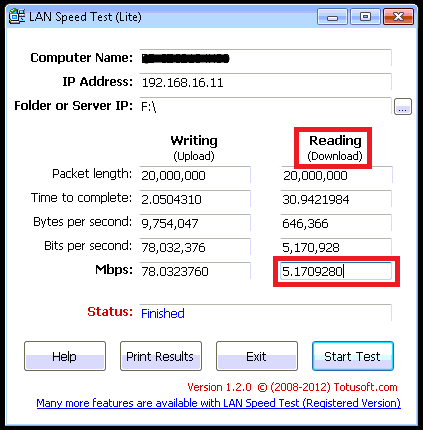
When running a LAN Speed Test it only reports a Read speed of 5 Mbps and Internet Speed tests also report terrible Download rates.

LANSpeedTestSlow


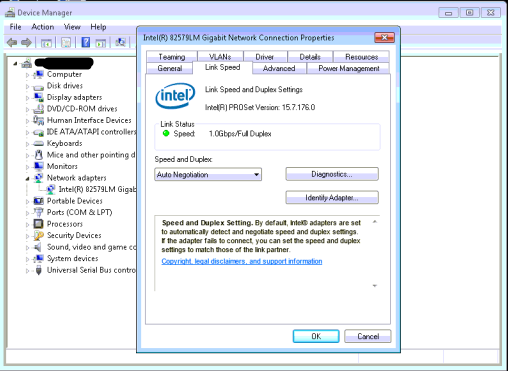
Upon changing the Speed and Duplex setting to Auto Negotiation the issue is resolved

Auto Negotiation


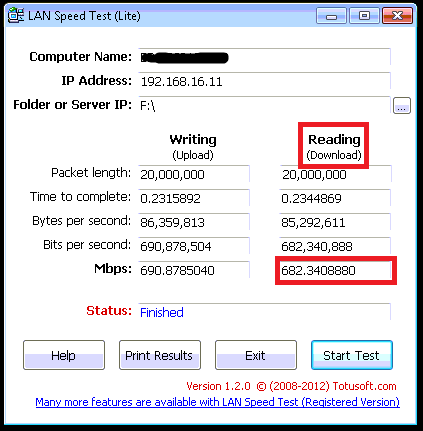
LAN speed test and www.speedtest.net results after making this change both indicate the issue is resolved

LANSpeedTestFixed

speedtestresult

Ntoskrnl.exe – Pre Service Pack 3 Revision History for Windows Server 2003 SP2 and Windows Small Business Server 2003 SP2 (SBS 2003)

Ntoskrnl.exe – Pre Service Pack 3 Revision History for Windows Server 2003 SP2 and Windows Small Business Server 2003 SP2 (SBS 2003)

07-Mar-2013 – 5.2.3790.5138 – Ntoskrnl.exe – x86/x64 – http://support.microsoft.com/kb/2813170 – MS13-031: Vulnerabilities in Windows Kernel could allow elevation of privilege: April 9, 2013

07-Jan-2013 – 5.2.3790.5107 – Ntoskrnl.exe – x86/x64 – http://support.microsoft.com/kb/2799494 – MS13-017: Vulnerabilities in Windows kernel could allow elevation of privilege: February 12, 2013

29-Nov-2012 – 5.2.3790.5097 – Ntoskrnl.exe – x86/x64 – http://support.microsoft.com/kb/2785487 – UMBs for MS-DOS-based applications are no longer available after you install security update 2724197 or hotfix 2732488 on a computer that is running Windows XP SP3 or Windows Server 2003 SP2