Category Archives: Windows

GPU Caps Viewer 1.17.0 Released

GPU Caps Viewer 1.17.0 has been released

New Features and Changes are as follows:

• Adds Support for OpenGL 4.3

• Adds Support for GeForce GTX 660 Ti

• Minor Changes to the User Interface

The official site and download links can be found here http://www.geeks3d.com/20120807/gpu-caps-viewer-1-17-0-with-opengl-4-3-support/

Perfnet.dll – Pre Service Pack 2 Revision History for Windows 7 SP1, Windows Server 2008 R2 SP1 and Windows Small Business Server 2011 (SBS 2011)

Perfnet.dll – Pre Service Pack 2 Revision History for Windows 7 SP1, Windows Server 2008 R2 SP1 and Windows Small Business Server 2011 (SBS 2011)

02-Aug-2012 – 6.1.7601.22077 – Perfnet.dll – x86/x64 – http://support.microsoft.com/kb/2740180 – Performance Monitor or a PDH function takes longer than expected to collect performance data on a computer that is running Windows 7 SP1 or Windows Server 2008 R2 SP1

13-Jul-2012 – 6.1.7601.22055 – Perfnet.dll – x86 – http://support.microsoft.com/kb/2733563 – You cannot query the Server Work Queues performance counter by using WMI in Windows Server 2008 R2

13-Jul-2012 – 6.1.7601.17899 – Perfnet.dll – x86 – http://support.microsoft.com/kb/2733563 – You cannot query the Server Work Queues performance counter by using WMI in Windows Server 2008 R2

Microsoft Outlook Out of Office (OOF) – Server is Currently Unavailable

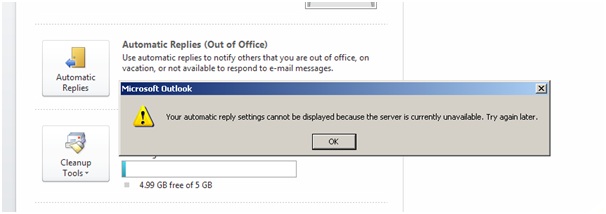
When you try and use the Out of Office feature in Microsoft Outlook you may recieve the following error message:

Your automatic reply settings cannot be displayed because the server is currently unavailable.  Try again later.


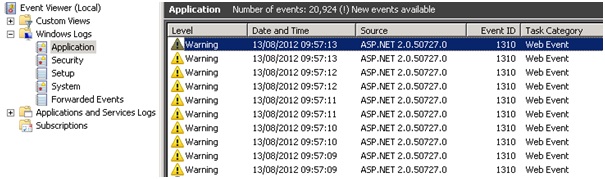
When you look at the Application Event Log on you Exchange Server you will see Event ID 1310 logged from Source ASP.NET 2.0.50727.0


Exception information:

Exception type: ConfigurationErrorsException

Exception message: The value for the property ‘maxRequestLength’ is not valid. The error is: The value must be inside the range 0-2097151. (C:\Program Files\Microsoft\Exchange Server\V14\ClientAccess\exchweb\EWS\web.config line 2376)

We need to modify the “web.config” file which can be found here “C:\Program Files\Microsoft\Exchange Server\V14\ClientAccess\exchweb\EWS\” you need to open the “web.config” file using Notepad and then use the “find” feature in notepad to quickly locate the following line in the file

<system.web>

<httpRuntime maxRequestLength=”52428800″ />

The default value is to high “52428800” so you need to change it as follows

<system.web>

<httpRuntime maxRequestLength=”2066661″ />

The final step in resolving the issue is to save the changes you have made to the “web.config” file and restarting the “Default Website” under IIS Manager (Administrative Tools)

Pdh.dll – Pre Service Pack 3 Revision History for Windows Vista SP2, Windows Server 2008 SP2 and Windows Small Business Server 2008 (SBS 2008)

Pdh.dll – Pre Service Pack 3 Revision History for Windows Vista SP2, Windows Server 2008 SP2 and Windows Small Business Server 2008 (SBS 2008)

31-Oct-2012 – 6.0.6002.22962 – Pdh.dll – x86/x64 – http://support.microsoft.com/kb/2760730 – Description of an update rollup that resolves interoperation issues in Windows Vista SP2, Windows Server 2008 SP2, Windows 7 SP1, and Windows Server 2008 R2 SP1

23-Jul-2010 – 6.0.6002.22453 – Pdh.dll – x86/x64 – http://support.microsoft.com/kb/2268318 – Duplicated data may be in the Performance log when you use the Performance Logs and Alerts service to collect performance data in Windows Server 2008, in Windows Vista, in Windows 7, or in Windows Server 2008 R2

14-May-2010 – 6.0.6002.22405 – Pdh.dll – x86/x64 – http://support.microsoft.com/kb/2028603 – A Data Collector Set may not restart after the stop condition is met in Performance Monitor on a Windows Vista or Windows Server 2008-based computer

12-Aug-2009 – 6.0.6002.22197 – Pdh.dll – x86/x64 – http://support.microsoft.com/kb/974605 – The Data Collector Set may not start on a computer that is running Windows Server 2008 or Windows Vista

05-Aug-2009 – 6.0.6002.22191 – Pdh.dll – x86/x64 – http://support.microsoft.com/kb/974248 – The log file size grows larger than the maximum file size limit that was set in Performance Monitor if you select a Comma Separated log format or a Tab Separated log format on a computer that is running Windows Server 2008 or Windows Vista

15-May-2009 – 6.0.6002.22137 – Pdh.dll – x86/x64 – http://support.microsoft.com/kb/970838 – The handle count and the memory usage of an application keep increasing if the application calls PDH APIs to add and delete V2 performance counters on a computer that is running Windows Server 2008 or Windows Vista