Category Archives: Windows 7

Windows Vista and Windows 7 – USB Audio Device or USB Headset can cause High CPU Usage and you may notice skipping in the sound playback

If you use a USB Headset, USB Speakers or USB Sound Card under Windows Vista or Windows 7 you may notice that the CPU Usage is very high when you are listening to sound, music or gaming.  You may also notice that the audio lags or skips as a result, this will normally occur every 10-20 seconds and may get worse over an extended period of time.

This is most likely to occur when the device is connected to a USB 2.0 EHCI (Enhanced Host Controller Interface)

The issue is caused by a problem with the usbport.sys driver that is part of Windows

The issue can be addressed in Windows 7 or Windows Server 2008 R2 by upgrading to “Service Pack 1”

The issue can be addressed in Windows Vista – Service Pack 2 or Windows Server 2008 – Service Pack 2 by applying the hotfix from http://support.microsoft.com/kb/981214 which includes an updated version of usbport.sys

Windows 7, Server 2008 R2 and SBS 2011 RTM or SP1 – svchost.exe may hold a lock on a service and cause slow Windows startup

You may find that svchost.exe holds a lock on a service whilst all the service libraries are being loaded.  This in turn then prevents any other services in the same instance of svchost.exe from starting up until the call to the function has been returned.

An updated version of svchost.exe that will address the issue is available here http://support.microsoft.com/kb/2510636

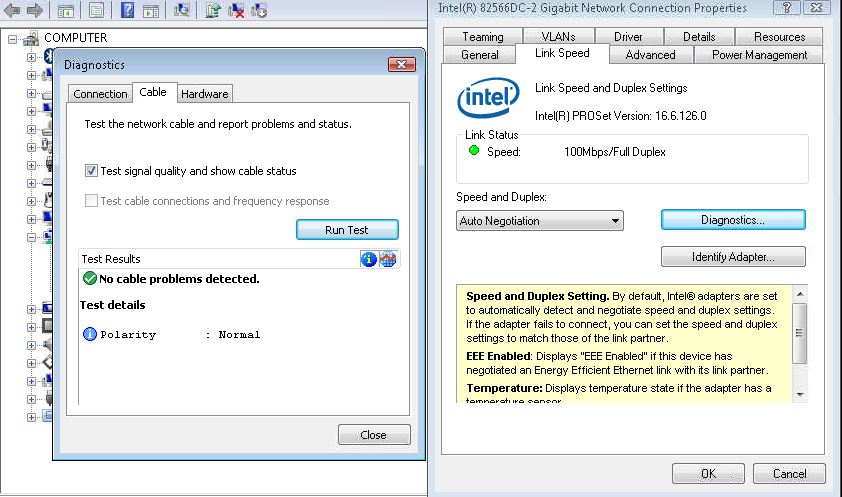
Intel Network Adapter Diagnostics May Wrongly Report that the Network Cable is over 100 Metres Long

When you run a Cable diagnostic using the Intel PROSet Network Adapter Diagnostics you may find that the utility incorrectly reports that your network cable is over 100 Metres and/or that the Cable is faulty/poor.

This issue can occur if you have a network switch that implements “power Saving” or “Green Ethernet” this feature is meant to reduce the power to a network port that is supporting a device with a short network cable run.

This “power saving” or “Green Ethernet” feature can cause the diagnostics to fail and can sometimes contribute to network drops and/or poor network throughput.  If you have a managed/smart switch then you can normally login via a browser and “Disable” this feature to correct the issue.

Windows 7, SBS 2011 or Windows Server 2008 R2 RTM and SP1 – Stop error message 0x0000007E and/or Kernel Sockets Leak on a Multi Processor Machine

You may suffer from a BSOD Stop Error Message with STOP: 0x0000007E and/or experience a Kernel Sockets Leak if you are running an older version of Ancillary Function Driver for Winsock or afd.sys

To prevent these two issues you need to be running the latest version of Afd.sys which can be downloaded from http://support.microsoft.com/kb/2579274