Tag Archives: “Service Pack 1”

Intel Network Adapter Diagnostics May Wrongly Report that the Network Cable is over 100 Metres Long

When you run a Cable diagnostic using the Intel PROSet Network Adapter Diagnostics you may find that the utility incorrectly reports that your network cable is over 100 Metres and/or that the Cable is faulty/poor.
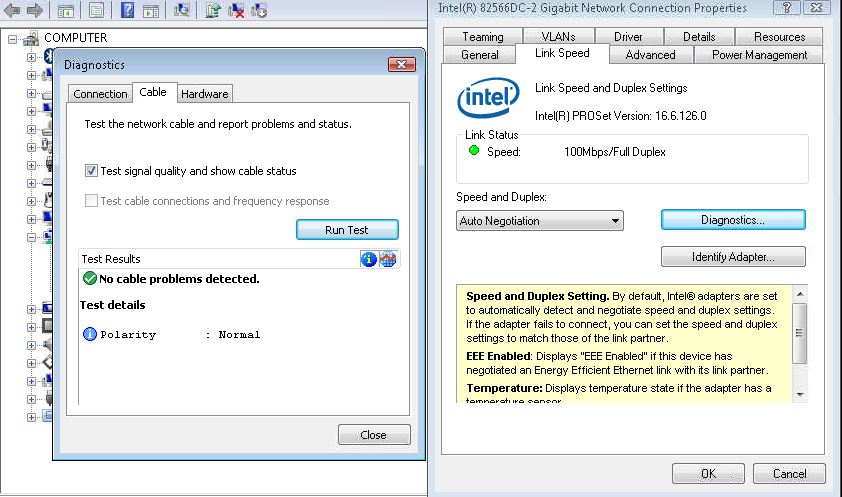
This issue can occur if you have a network switch that implements “power Saving” or “Green Ethernet” this feature is meant to reduce the power to a network port that is supporting a device with a short network cable run.

This “power saving” or “Green Ethernet” feature can cause the diagnostics to fail and can sometimes contribute to network drops and/or poor network throughput.  If you have a managed/smart switch then you can normally login via a browser and “Disable” this feature to correct the issue.

Windows 7, SBS 2011 or Windows Server 2008 R2 RTM and SP1 – Stop error message 0x0000007E and/or Kernel Sockets Leak on a Multi Processor Machine

You may suffer from a BSOD Stop Error Message with STOP: 0x0000007E and/or experience a Kernel Sockets Leak if you are running an older version of Ancillary Function Driver for Winsock or afd.sys

To prevent these two issues you need to be running the latest version of Afd.sys which can be downloaded from http://support.microsoft.com/kb/2579274

Windows Server 2008 R2 – RTM and SP1 may not respond to a request for a Sender Policy Framework (SPF) TXT Record Correctly if it exceeds 512 bytes

In this scenario if the Sender Policy Framework TXT record exceeds 512 bytes in size then you may find your server anti-spam fails to correctly identify e-mail as either legitimate mail or SPAM, this can result in the two extremes of SPAM mail being delivered to users or legitimate e-mail being rejected as SPAM.

Microsoft do offer a hotfix for DNS Server to prevent this issue KB 2495375 http://support.microsoft.com/kb/2495375

[RESOLVED] Windows Fax and Scan – Invalid procedure call or argument URL: res://ieframe.dll/preview.js

When you try to use Windows Fax and Scan to send a fax message with content in the body section of the fax you may get an error similar to the following example:

Script Error

Line: 2107

Char: 1

Error: Invalid procedure call or argument

Code: 0

URL: res://ieframe.dll/preview.js

This seems to start occurring after Internet Explorer 9 is installed and currently it seems that the only workaround is to uninstall Internet Explorer 9 or not enter text into the body section of the fax.

Following on from our Microsoft PSS case we have been given two different solutions to this issue, the first is to apply the latest Cumulative Security Update for Internet Explorer.  This can be obtained via Microsoft Update or Windows Update and may have already been installed automatically.  You can find further information here MS11-099: Cumulative Security Update for Internet Explorer: December 13, 2011 http://support.microsoft.com/kb/2618444

Another possible fix for this issue is to apply the hotfix mentioned in Microsoft KB 2647169 http://support.microsoft.com/kb/2647169 this applies to Windows 7, Windows Server 2008 R2 and Microsoft Windows Small Business Server 2011 (SBS 2011).

A case is open with Microsoft PSS regarding this issue and once I have more permanent fix I will post it here.

Here is the official stance from Microsoft on this issue http://support.microsoft.com/kb/2629557