Tag Archives: Version

Version.dll – Pre Service Pack 3 Revision History for Windows Server 2008 SP2, Windows Vista SP2 and Windows Small Business Server 2008 (SBS 2008)

Version.dll – Pre Service Pack 3 Revision History for Windows Server 2008 SP2, Windows Vista SP2 and Windows Small Business Server 2008 (SBS 2008)

08-Jul-2011 – 6.0.6002.22674 – Version.dll – x86/x64 – http://support.microsoft.com/kb/2578214 – An application crashes when it tries to retrieve file information from an invalid or corrupted file in Windows Vista, in Windows Server 2008, in Windows 7 or in Windows Server 2008 R2

DD-WRT Firmware Revision Histroy for the D-Link DIR-615 Rev D1 D2 D3 and D4 (Includes Virgin Media Supplied D-Link DIR-615 Router)

DD-WRT Firmware Revision Histroy for the D-Link DIR-615 Rev D1 D2 D3 and D4 (Includes Virgin Media Supplied D-Link DIR-615 Router)

r20119 V24-preSP2 – 10-12-2012 – ftp://dd-wrt.com/others/eko/BrainSlayer-V24-preSP2/2012/10-12-12-r20119-testing/dlink-dir615d/

r20086 V24-preSP2 – 10-06-2012 – ftp://dd-wrt.com/others/eko/BrainSlayer-V24-preSP2/2012/10-06-12-r20086-testing/dlink-dir615d/

r19519 V24-preSP2 – 07-20-2012 – ftp://dd-wrt.com/others/eko/BrainSlayer-V24-preSP2/2012/07-20-12-r19519/dlink-dir615d/

r19342 V24-preSP2 – 06-08-2012 – ftp://dd-wrt.com/others/eko/BrainSlayer-V24-preSP2/2012/06-08-12-r19342/dlink-dir615d/

r19327 V24-preSP2 – 06-06-2012 – ftp://dd-wrt.com/others/eko/BrainSlayer-V24-preSP2/2012/06-06-12-r19327/dlink-dir615d/

r18777 V24-preSP2 – 03-19-2012 – ftp://dd-wrt.com/others/eko/BrainSlayer-V24-preSP2/2012/03-19-12-r18777/dlink-dir615d/

r18767 V24-preSP2 – 03-08-2012 – ftp://dd-wrt.com/others/eko/BrainSlayer-V24-preSP2/2012/03-08-12-r18767/dlink-dir615d/

r18740 V24-preSP2 – 03-08-2012 – ftp://dd-wrt.com/others/eko/BrainSlayer-V24-preSP2/2012/03-08-12-r18740/dlink-dir615d/

r18687 V24-preSP2 – 03-08-2012 – ftp://dd-wrt.com/others/eko/BrainSlayer-V24-preSP2/2012/03-08-12-r18687/files/dlink-dir615d/

r18024 V24-preSP2 – 12-20-2011 – ftp://dd-wrt.com/others/eko/BrainSlayer-V24-preSP2/2011/12-20-11-r18024/dlink-dir615d/

r18007 V24-preSP2 – 12-14-2011 – ftp://dd-wrt.com/others/eko/BrainSlayer-V24-preSP2/2011/12-14-11-r18007/dlink-dir615d/

r18000 V24-preSP2 – 12-12-2011 – ftp://dd-wrt.com/others/eko/BrainSlayer-V24-preSP2/2011/12-12-11-r18000/dlink-dir615d/

r17990 V24-preSP2 – 12-09-2011 – ftp://dd-wrt.com/others/eko/BrainSlayer-V24-preSP2/2011/12-09-11-r17990/dlink-dir615d/

r17967 V24-preSP2 – 12-07-2011 – ftp://dd-wrt.com/others/eko/BrainSlayer-V24-preSP2/2011/12-07-11-r17967/dlink-dir615d/

r17201 V24-preSP2 – 06-14-2011 – ftp://dd-wrt.com/others/eko/BrainSlayer-V24-preSP2/2011/06-14-11-r17201/dlink-dir615d/

r16994 V24-preSP2 – 05-08-2011 – ftp://dd-wrt.com/others/eko/BrainSlayer-V24-preSP2/2011/05-08-11-r16994/dlink-dir615d/

r16785 V24-preSP2 – 04-09-2011 – ftp://dd-wrt.com/others/eko/BrainSlayer-V24-preSP2/2011/04-09-11-r16785/dlink-dir615d/

r16754 V24-preSP2 – 04-09-2011 – ftp://dd-wrt.com/others/eko/BrainSlayer-V24-preSP2/2011/04-09-11-r16754/dlink-dir615d/

r16454 V24-preSP2 – 03-17-2011 – ftp://dd-wrt.com/others/eko/BrainSlayer-V24-preSP2/2011/03-17-11-r16454/dlink-dir615d/

r16214 V24-preSP2 – 02-17-2011 – ftp://dd-wrt.com/others/eko/BrainSlayer-V24-preSP2/2011/02-17-11-r16214/dlink-dir615d/

r15962 V24-preSP2 – 12-24-2010 – ftp://dd-wrt.com/others/eko/BrainSlayer-V24-preSP2/2010/12-24-10-r15962/dlink-dir615d/

r15940 V24-preSP2 – 12-18-2010 – ftp://dd-wrt.com/others/eko/BrainSlayer-V24-preSP2/2010/12-18-10-r15940/dlink-dir615d/

r15778 V24-preSP2 – 11-21-2010 – ftp://dd-wrt.com/others/eko/BrainSlayer-V24-preSP2/2010/11-21-10-r15778/dlink-dir615d/

r15704 V24-preSP2 – 11-09-2010 – ftp://dd-wrt.com/others/eko/BrainSlayer-V24-preSP2/2010/11-09-10-r15704/dlink-dir615d/

r15693 V24-preSP2 – 11-06-2010 – ftp://dd-wrt.com/others/eko/BrainSlayer-V24-preSP2/2010/11-06-10-r15693/dlink-dir615d/

r15506 V24-preSP2 – 10-26-2010 – ftp://dd-wrt.com/others/eko/BrainSlayer-V24-preSP2/2010/10-26-10-r15506/dlink-dir615d/

r15501 V24-preSP2 – 10-25-2010 – ftp://dd-wrt.com/others/eko/BrainSlayer-V24-preSP2/2010/10-25-10-r15501/dlink-dir615d/

r15437 V24-preSP2 – 10-12-2010 – ftp://dd-wrt.com/others/eko/BrainSlayer-V24-preSP2/2010/10-12-10-r15437/dlink-dir615d/

r15407 V24-preSP2 – 10-09-2010 – ftp://dd-wrt.com/others/eko/BrainSlayer-V24-preSP2/2010/10-09-10-r15407/dlink-dir615d/

r15362 V24-preSP2 – 10-05-2010 – ftp://dd-wrt.com/others/eko/BrainSlayer-V24-preSP2/2010/10-05-10-r15362/dlink-dir615d/

r15334 V24-preSP2 – 10-02-2010 – ftp://dd-wrt.com/others/eko/BrainSlayer-V24-preSP2/2010/10-02-10-r15334/dlink-dir615d/

r14929 V24-preSP2 – 08-12-2010 – ftp://dd-wrt.com/others/eko/BrainSlayer-V24-preSP2/2010/08-12-10-r14929/dlink-dir615d/

r14896 V24-preSP2 – 08-07-2010 – ftp://dd-wrt.com/others/eko/BrainSlayer-V24-preSP2/2010/08-07-10-r14896/dlink-dir615d/

r14815 V24-preSP2 – 07-16-2010 – ftp://dd-wrt.com/others/eko/BrainSlayer-V24-preSP2/2010/07-16-10-r14815/dlink-dir615d/

r14684 V24-preSP2 – 06-30-2010 – ftp://dd-wrt.com/others/eko/BrainSlayer-V24-preSP2/2010/06-30-10-r14684/dlink-dir615d/

r14594 V24-preSP2 – 06-12-2010 – ftp://dd-wrt.com/others/eko/BrainSlayer-V24-preSP2/2010/06-12-10-r14594/dlink-dir615d/

r14569 V24-preSP2 – 06-09-2010 – ftp://dd-wrt.com/others/eko/BrainSlayer-V24-preSP2/2010/06-09-10-r14569/dlink-dir615d/

r14537 V24-preSP2 – 06-03-2010 – ftp://dd-wrt.com/others/eko/BrainSlayer-V24-preSP2/2010/06-03-10-r14537/dlink-dir615d/

r14473 V24-preSP2 – 05-25-2010 – ftp://dd-wrt.com/others/eko/BrainSlayer-V24-preSP2/2010/05-25-10-r14473/dlink-dir615d/

r14289 V24-preSP2 – 04-16-2010 – ftp://dd-wrt.com/others/eko/BrainSlayer-V24-preSP2/2010/04-16-10-r14289/dlink-dir615d/

r14280 V24-preSP2 – 04-15-2010 – ftp://dd-wrt.com/others/eko/BrainSlayer-V24-preSP2/2010/04-15-10-r14280/dlink-dir615d/

r13637 V24-preSP2 – 01-16-2010 – ftp://dd-wrt.com/others/eko/BrainSlayer-V24-preSP2/2010/01-16-10-r13637/dlink-dir615d2/ (d2 Revision Only)

How to find the version, edition, Service Pack and Cumulative Update Version of Microsoft SQL Server and its associated components

If you want to find out the version and edition of Microsoft SQL Server then please take a look at Microsoft KB 321185 http://support.microsoft.com/kb/321185

This will show you how to find versions for SQL Server 2000, SQL Server 2005, SQL Server 2008, SQL Server 2008 R2 and SQL Server 2012

SQL Server 2005

Microsoft SQL Server 2005 Cumulative Updates that have been released after SQL Server 2005 – Service Pack 2 http://support.microsoft.com/kb/937137

Microsoft SQL Server 2005 Cumulative Updates that have been released after SQL Server 2005 – Service Pack 3 http://support.microsoft.com/kb/960598

Microsoft SQL Server 2005 Cumulative Updates that have been released after SQL Server 2005 – Service Pack 4 http://support.microsoft.com/kb/2485757

SQL Server 2008

Microsoft SQL Server 2008 Cumulative Updates that have been released since SQL Server 2008 – RTM http://support.microsoft.com/kb/956909

Microsoft SQL Server 2008 Cumulative Updates that have been released after SQL Server 2008 – Service Pack 1 http://support.microsoft.com/kb/970365

Microsoft SQL Server 2008 Cumulative Updates that have been released after SQL Server 2008 – Service Pack 2 http://support.microsoft.com/kb/2402659

Microsoft SQL Server 2008 Cumulative Updates that have been released after SQL Server 2008 – Service Pack 3 http://support.microsoft.com/kb/2629969

SQL Server 2008 R2

Microsoft SQL Server 2008 R2 Cumulative Updates that have been released since SQL Server 2008 R2 – RTM http://support.microsoft.com/kb/981356

Microsoft SQL Server 2008 R2 Cumulative Updates that have been released after SQL Server 2008 R2 – Service Pack 1 http://support.microsoft.com/kb/2567616

Microsoft SQL Server 2008 R2 Cumulative Updates that have been released after SQL Server 2008 R2 – Service Pack 2 http://support.microsoft.com/kb/2730301

SQL Server 2012

Microsoft SQL Server 2012 Cumulative Updates that have been released since SQL Server 2012 – RTM http://support.microsoft.com/kb/2692828

Microsoft SQL Server 2012 Cumulative Updates that have been released since SQL Server 2012 – Service Pack 1

http://support.microsoft.com/kb/2772858
Microsoft Windows based Computers and Laptops – Slow System Startup with Realtek HD Audio Chipset

You may find that Windows based computers and laptops are very slow to startup and in some instances slow to shutdown.  This has been witnessed when out dated drivers are installed for the integrted Realtek HD Audio Chipset.

The Realtek HD Audio drivers offered on Microsoft Update are often dated 2005 and are many years behind those available directly from the Audio Chipset manufacturer.

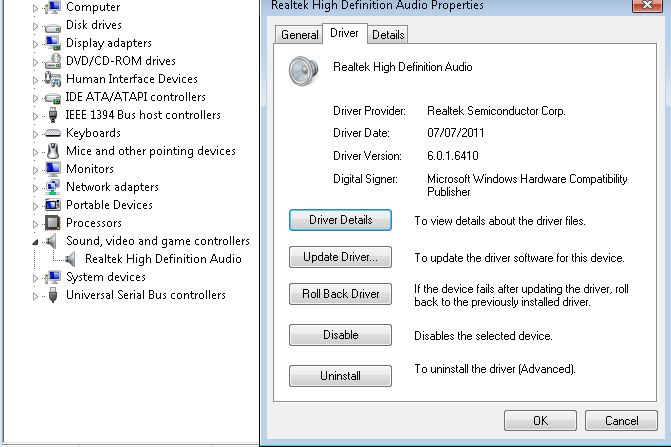
You can verify your current Audio Chipset and Driver version from “Device Manager”

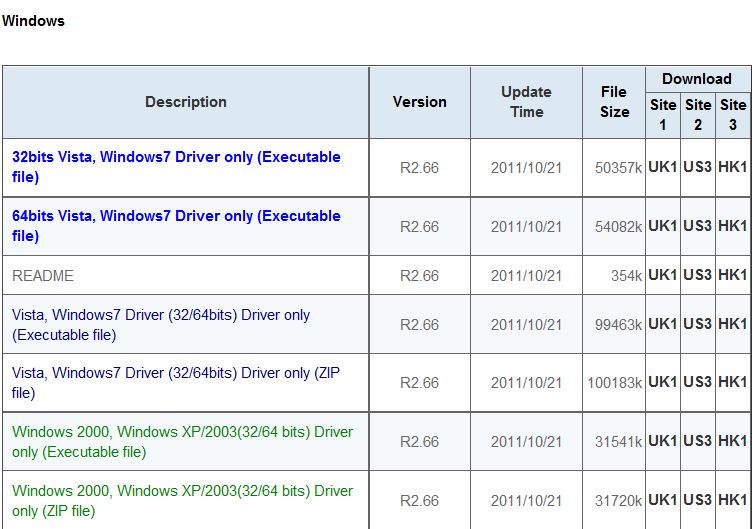
Please visit http://www.realtek.com/downloads/ to find and download the latest applicable drivers for your Windows system.  They will usually reference the drivers as “High Definition Audio Codecs (Software)” and then under Windows the list Operating System Compatability for each system and provide several download links based upon locations around the world.  Downloads from the Realtek site can be slow at busy times of the day so you may need to be patient and/or download outside peak hours.

As you can see from the table the current drivers from Realtek Support are dated 21st October 2011 and are usually updated every 1-2 months, it would be worth updating to the latest release to resolve your slow startup times and then add updating your audio drivers into your usual computer maintenance schedule.  Once you have updated remember to check Device Manager to ensure that the latest drivers are actually installed and that the device is operating correctly.