Ntkrnlpa.exe – Pre Service Pack 3 Revision History for Windows Server 2003 SP2 and Windows Small Business Server 2003 SP2 (SBS 2003)
29-Nov-2012 – 5.2.3790.5097 – Ntkrnlpa.exe – x86 – http://support.microsoft.com/kb/2785487 – UMBs for MS-DOS-based applications are no longer available after you install security update 2724197 or hotfix 2732488 on a computer that is running Windows XP SP3 or Windows Server 2003 SP2
Ntkrnlmp.exe – Pre Service Pack 3 Revision History for Windows Server 2003 SP2 and Windows Small Business Server 2003 SP2 (SBS 2003)
Ntkrnlmp.exe – Pre Service Pack 3 Revision History for Windows Server 2003 SP2 and Windows Small Business Server 2003 SP2 (SBS 2003)
29-Nov-2012 – 5.2.3790.5097 – Ntkrnlmp.exe – x86/x64 – http://support.microsoft.com/kb/2785487 – UMBs for MS-DOS-based applications are no longer available after you install security update 2724197 or hotfix 2732488 on a computer that is running Windows XP SP3 or Windows Server 2003 SP2
Change of behaviour with TRAN (Transfer) key after upgrading Yealink T3X and Yealink T2X Firmware to V70
I have noticed a change of behaviour with TRAN (Transfer) key after upgrading Yealink T3X and Yealink T2X to the new V70 firmware along with upgrading 3CX Version 11 to Service Pack 3.
It appears that the default DSS Key Transfer Mode is changed from Attended Transfer to Blind Transfer. An Attended Transfer was always performed when you used the BLF/DSS Keys to perform the Transfer in previous Yealink firmware versions. For example A calls B wanting to speak with C, B presses TRAN button and then presses the BLF/DSS Key for C. In this instance B should be able to speak with C (Attended Transfer) to see if they want to take the call rather than A just being passed straight to C (Blind Transfer).
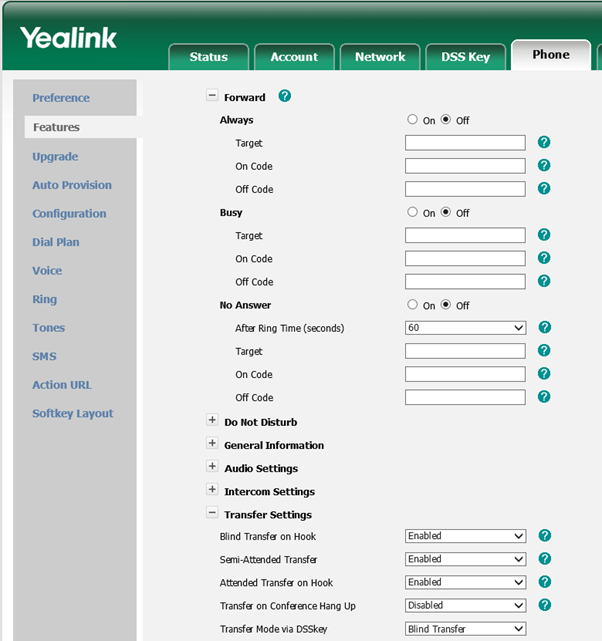
You need to login to the Yealink HTTP Interface and then navigate to Phone->Features->Transfer Settings and Change “Transfer Mode via DSSKey” to “Attended Transfer” by using the drop down menu.
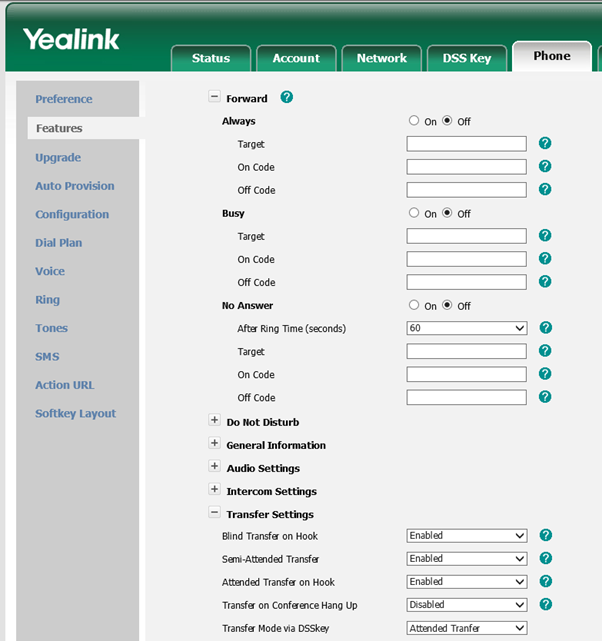
So by changing this simple setting you can restore the Attended Transfer function whilst still taking advantage of the V70 Firmware for your Yealink Phone.
Apple release iTunes 11.0 (32 Bit and 64 Bit Editions)
Apple iTunes 11.0 (32 Bit and 64 Bit Editions) provides the following enhancements and security fixes
• Completely Redesigned. iTunes makes it more fun to explore and enjoy your music, movies, and TV shows. You’ll love the beautiful edge-to-edge design, custom designs for each album, movie, or TV show in your library, and getting personal recommendations any time you click In the Store.
• A New Store. The iTunes Store has been completely redesigned and now features a clean look that makes it simpler than ever to see what’s hot and discover new favorites.
• Play purchases from iCloud. Your music, movie, and TV show purchases in iCloud now appear inside your library. Just sign-in with your Apple ID to see them. Double-click to play them directly from iCloud or download a copy you can sync to a device or play while offline.
• Up Next. It’s now simple to see which songs are playing next, all from a single place. Just click the Up Next icon in the center display and they’ll instantly appear. You can even reorder, add, or skip songs whenever you like.
• New MiniPlayer. You can now do a whole lot more with a lot less space. In addition to showing what’s playing, MiniPlayer now includes album art, adds Up Next, and makes it easy to search for something new to play—all from a smaller and more elegant design.
• Improved search. It’s never been easier to find what you’re looking for in iTunes. Just type in the search field and you’ll instantly see results from across your entire library. Select any result and iTunes takes you right to it.
• Playback syncing. iCloud now remembers your place in a movie or TV show for you. Whenever you play the same movie or episode from your iPhone, iPad, iPod touch, or Apple TV, it will continue right where you left off.
You can download Apple iTunes 11.0 by visiting the following link http://www.apple.com/itunes/