Tag Archives: Microsoft

Microsoft Exchange 2013 Preview

Give the new Microsoft Exchange 2013 Preview a try, you can download it from the Technet Site using the link below

http://technet.microsoft.com/en-US/evalcenter/hh973395.aspx?wt.mc_id=TEC_116_1_33

You will require one of the following operating systems to install the Exchange 2013 Preview:

  • Windows Server 2012
  • Windows Server 2008 R2 Standard with SP1
  • Windows Server 2008 R2 Enterprise with SP1
  • Windows Server 2008 R2 Datacenter RTM or later

Exchange 2013 Preview allows you to use one of the following Microsoft Outlook or Microsoft Entourage clients:

  • Outlook 2013 (Preview)
  • Outlook 2010 SP1 (with April 2012 Cumulative Update)
  • Outlook 2007 SP3 (with July 2012 Cumulative Update)
  • Entourage 2008 for Mac (Web Services Edition)
  • Outlook  for Mac 2011

You will require one of the following operating systems to install the Exchange 2013 Management tools:

  • Windows Server 2012
  • Windows Server 2008 R2 Standard with SP1
  • Windows Server 2008 R2 Enterprise with SP1
  • Windows Server 2008 R2 Datacenter RTM or later
  • 64-bit edition of Windows 8 Release Preview
  • 64-bit edition of Windows 7 with SP1

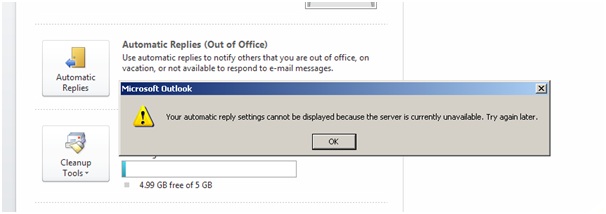
Microsoft Outlook Out of Office (OOF) – Server is Currently Unavailable

When you try and use the Out of Office feature in Microsoft Outlook you may recieve the following error message:

Your automatic reply settings cannot be displayed because the server is currently unavailable.  Try again later.


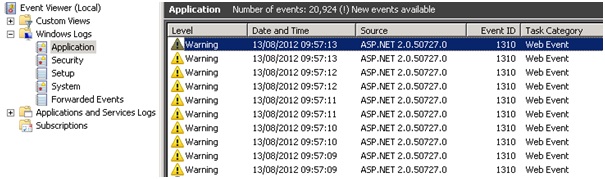
When you look at the Application Event Log on you Exchange Server you will see Event ID 1310 logged from Source ASP.NET 2.0.50727.0


Exception information:

Exception type: ConfigurationErrorsException

Exception message: The value for the property ‘maxRequestLength’ is not valid. The error is: The value must be inside the range 0-2097151. (C:\Program Files\Microsoft\Exchange Server\V14\ClientAccess\exchweb\EWS\web.config line 2376)

We need to modify the “web.config” file which can be found here “C:\Program Files\Microsoft\Exchange Server\V14\ClientAccess\exchweb\EWS\” you need to open the “web.config” file using Notepad and then use the “find” feature in notepad to quickly locate the following line in the file

<system.web>

<httpRuntime maxRequestLength=”52428800″ />

The default value is to high “52428800” so you need to change it as follows

<system.web>

<httpRuntime maxRequestLength=”2066661″ />

The final step in resolving the issue is to save the changes you have made to the “web.config” file and restarting the “Default Website” under IIS Manager (Administrative Tools)

Intel Rapid Storage Technology Driver Revision History (AHCI and RAID)

Intel Rapid Storage Technology Driver Revision History (AHCI and RAID)

19.5.2.1049.5
19.5.2.1049.4
19.5.1.1040.3
19.5.1.1040
19.2.1.1006
18.7.6.1010.3
18.6.1.1016.1
18.30.1.1138
18.1.0.1028.2
18.0.1.1138.1
17.11.3.1010.2
17.11.0.1000
17.9.1.1009
17.5.2.1024
17.5.1.1021
16.8.5.1014.5
16.8.0.1000
15.9.8.1050
15.9.0.1015
15.8.1.1007
15.7.0.1014
15.5.0.1051
14.8.16.1063
14.8.14.1063
14.8.14.1061
14.5.0.1081
12.9.0.1001
12.5.0.1066 – 05/03/2013 – http://downloadcenter.intel.com/Detail_Desc.aspx?DwnldID=22271

11.7.0.1013 – 12/06/2012 – http://downloadcenter.intel.com/Detail_Desc.aspx?DwnldID=22270

11.6.0.1030 – 09/13/2012 – http://downloadcenter.intel.com/Detail_Desc.aspx?DwnldID=21852

11.5.0.1207 – 07/24/2012 – http://downloadcenter.intel.com/Detail_Desc.aspx?DwnldID=21592

11.2.0.1006 – 06/11/2012 – http://downloadcenter.intel.com/Detail_Desc.aspx?DwnldID=21407

11.0.0.1032 – 02/10/2012 – http://downloadcenter.intel.com/Detail_Desc.aspx?DwnldID=20868

10.8.0.1003 – 11/11/2011 – http://downloadcenter.intel.com/Detail_Desc.aspx?DwnldID=20624

10.6.0.1022 – 11/29/2011 – http://downloadcenter.intel.com/Detail_Desc.aspx?DwnldID=20707

10.1.0.1008 – 11/29/2010 – http://downloadcenter.intel.com/Detail_Desc.aspx?DwnldID=20104

Please feel free to comment on your results with the latest Intel Rapid Storage Driver

Microsoft.sharepoint.dll – Pre Service Pack 4 Revision History for Windows SharePoint Services 3.0 Service Pack 3

Microsoft.sharepoint.dll – Pre Service Pack 4 Revision History for Windows SharePoint Services 3.0 Service Pack 3

07-Mar-2013 – 12.0.6676.5000 – Microsoft.sharepoint.dll – x86/x64 – http://support.microsoft.com/kb/2799869 – Description of the Windows SharePoint Services 3.0 cumulative update server hotfix package (WSS server-package): April 9, 2013

08-Jan-2013 – 12.0.6673.5000 – Microsoft.sharepoint.dll – x86/x64 – http://support.microsoft.com/kb/2760816 – Description of the Windows SharePoint Services 3.0 cumulative update server hotfix package (WSS server-package): February 12, 2013

06-Nov-2012 – 12.0.6670.5000 – Microsoft.sharepoint.dll – x86/x64 – http://support.microsoft.com/kb/2760571 – Description of the Windows SharePoint Services 3.0 cumulative update server hotfix package (WSS server-package): December 11, 2012

28-Aug-2012 – 12.0.6666.5000 – Microsoft.sharepoint.dll – x86/x64 – http://support.microsoft.com/kb/2687535 – Description of the Windows SharePoint Services 3.0 cumulative update server hotfix package (WSS server-package): October 30, 2012

07-Aug-2012 – 12.0.6665.5000 – Microsoft.sharepoint.dll – x86/x64 – http://support.microsoft.com/kb/2687331 – Description of the Windows SharePoint Services 3.0 cumulative update server hotfix package (WSS server-package): August 28, 2012

07-Aug-2012 – 12.0.6665.5000 – Microsoft.sharepoint.dll – x86/x64 – http://support.microsoft.com/kb/2687327 – Description of the Windows SharePoint Services 3.0 hotfix package (Sts-x-none.msp): August 28, 2012

06-Jun-2012 – 12.0.6662.5000 – Microsoft.sharepoint.dll – x86/x64 – http://support.microsoft.com/kb/2687257 – Description of the Windows SharePoint Services 3.0 cumulative update server hotfix package (WSS server-package): June 26, 2012

10-Jun-2012 – 12.0.6662.5000 – Microsoft.sharepoint.dll – x86/x64 – http://support.microsoft.com/kb/2598389 – Description of the Windows SharePoint Services 3.0 hotfix package (Sts-x-none.msp): June 26, 2012

03-Apr-2012 – 12.0.6661.5000 – Microsoft.sharepoint.dll – x86/x64 – http://support.microsoft.com/kb/2598263 – Description of the Windows SharePoint Services 3.0 hotfix package (Sts-x-none.msp): April 24, 2012

03-Apr-2012 – 12.0.6661.5000 – Microsoft.sharepoint.dll – x86/x64 – http://support.microsoft.com/kb/2598130 – Description of the Windows SharePoint Services 3.0 cumulative update server hotfix package (WSS server-package): April 24, 2012

07-Feb-2012 – 12.0.6658.5000 – Microsoft.sharepoint.dll – x86/x64 – http://support.microsoft.com/kb/2597959 – Description of the Windows SharePoint Services 3.0 cumulative update server hotfix package (WSS server-package): February 28, 2012

07-Feb-2012 – 12.0.6658.5000 – Microsoft.sharepoint.dll – x86/x64 – http://support.microsoft.com/kb/2597951 – Description of the Windows SharePoint Services 3.0 hotfix package (Sts-x-none.msp): February 28, 2012

15-Nov-2011 – 12.0.6656.5000 – Microsoft.sharepoint.dll – x86/x64 – http://support.microsoft.com/kb/2596987 – Description of the Windows SharePoint Services 3.0 cumulative update server hotfix package (WSS server-package): December 13, 2011

15-Nov-2011 – 12.0.6656.5000 – Microsoft.sharepoint.dll – x86/x64 – http://support.microsoft.com/kb/2596983 – Description of the Windows SharePoint Services 3.0 hotfix package (Sts-x-none.msp): December 13, 2011

27-Sep-2011 – 12.0.6653.5000 – Microsoft.sharepoint.dll – x86/x64 – http://support.microsoft.com/kb/2596541 – Description of the Windows SharePoint Services 3.0 cumulative update server hotfix package (WSS server-package): October 25, 2011

29-Sep-2011 – 12.0.6653.5000 – Microsoft.sharepoint.dll – x86/x64 – http://support.microsoft.com/kb/2596534 – Description of the Windows SharePoint Services 3.0 hotfix package (Sts-x-none.msp): October 25, 2011