Microsoft Outlook Out of Office (OOF) – Server is Currently Unavailable

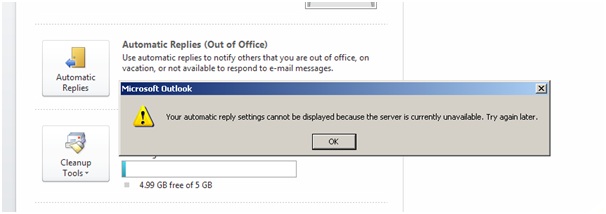
When you try and use the Out of Office feature in Microsoft Outlook you may recieve the following error message:

Your automatic reply settings cannot be displayed because the server is currently unavailable.  Try again later.


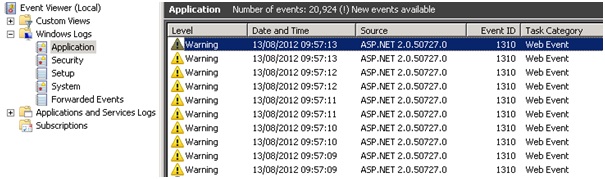
When you look at the Application Event Log on you Exchange Server you will see Event ID 1310 logged from Source ASP.NET 2.0.50727.0


Exception information:

Exception type: ConfigurationErrorsException

Exception message: The value for the property ‘maxRequestLength’ is not valid. The error is: The value must be inside the range 0-2097151. (C:\Program Files\Microsoft\Exchange Server\V14\ClientAccess\exchweb\EWS\web.config line 2376)

We need to modify the “web.config” file which can be found here “C:\Program Files\Microsoft\Exchange Server\V14\ClientAccess\exchweb\EWS\” you need to open the “web.config” file using Notepad and then use the “find” feature in notepad to quickly locate the following line in the file

<system.web>

<httpRuntime maxRequestLength=”52428800″ />

The default value is to high “52428800” so you need to change it as follows

<system.web>

<httpRuntime maxRequestLength=”2066661″ />

The final step in resolving the issue is to save the changes you have made to the “web.config” file and restarting the “Default Website” under IIS Manager (Administrative Tools)

Watchguard XTM 1050, XTM 2050, XTM 2 Series, XTM 3 Series, XTM 5 Series, XTM 8 Series – Fireware XTM OS 11.6.1 – Build # 346666

Watchguard XTM 1050, XTM 2050, XTM 2 Series, XTM 3 Series, XTM 5 Series, XTM 8 Series – Fireware XTM OS 11.6.1 – Build # 346666

11.6.1 – Build # 346666 Provides some new features and resolves the following issues:

• This release introduces support for the new high-performance XTM 5 Series models 515, 525, 535, and 545

• Provides an update to our localized user interfaces and documentation

• An XTM device configured in bridge mode can now pass VLAN traffic between 802.1Q switches or bridges

• FireCluster support for XTM 25, 26, and 33 wired models

• Several issues have been resolved in this release that caused XTM devices to crash when configured to use Application Control or IPS [66937, 65426, 65636, 67312, 66135, 67159, 67399, 67310]

• An issue was resolved that caused some XTM device processes to crash when running Mu Dynamics default published vulnerability test [66490]

• An issue was resolved that caused a kernel crash and device reboot [67329]

• The XTM 2 Series device can now handle a large file transfer without interface instability [67367]

• A problem that caused incorrect data to display on the XTM 5 Series LCD screen has been resolved [67197]

• Policy Manager now displays the correct VLAN limits for XTM 5 Series models 505, 510, 520, and 530 with a standard Fireware XTM feature key (not Pro) [67780]

• You can now successfully configure and apply Traffic Management actions for XTM 2 and 3 Series devices from the Web UI [67221, 66645]

• Firebox X Edge e-Series devices can now be successfully managed with templates [67658]

• The notification message sent when a local Log or Report database is down now correctly shows the host IP address instead of “???” [41731]

• The Log Server can now handle backup files greater than 2GB in size without generating an error message: “Error (8199), Exception during backup of oldest log data: File is not a zip file” exception” [66811]

• The DHCP lease activity report now works correctly [66062]

• Log Collector now handles XTM device log data that spans multiple SSL/TLS records without crashing [66347]

• A problem has been resolved that caused poor performance on XTM 2 Series models 25 and 26 because of an incorrect memory allocation for security subscription signatures [67240]

• A deny message is now correctly sent to the web browser in most cases when Application Control blocks content in the Web/Web 2.0 category [66201]

• The WebBlocker automatic database update time is no longer off by one hour when daylight savings time is in effect on the host server’s timezone [67551]

• If you use PPPoE or DHCP for an external interface on an XTM device configured to use multi-WAN, the XTM device no longer loses the default routes for external interfaces after the external interface reconnects [67424, 67520]

• A problem has been resolved that caused a static route to fail after an external interface configured to use PPPoE is disconnected, then reconnected [67520]

• Tagged VLAN traffic is now correctly recognized when an XTM device is configured in Bridge mode [64355]

• The CLl command “restore factory default all” now successfully restores a device to its factory default settings [66240]

• An issue has been resolved that caused Policy Manager to incorrectly display an interface IP address as 0.0.0.0/24 when you viewed a FireCluster configuration for a cluster in drop-in mode [63551]

• The Mobile VPN with SSL process no longer crashes during a FireCluster failover [66118]

You can download 11.6.1 – Build # 346666 from the Watchguard website
Pdh.dll – Pre Service Pack 3 Revision History for Windows Vista SP2, Windows Server 2008 SP2 and Windows Small Business Server 2008 (SBS 2008)

Pdh.dll – Pre Service Pack 3 Revision History for Windows Vista SP2, Windows Server 2008 SP2 and Windows Small Business Server 2008 (SBS 2008)

31-Oct-2012 – 6.0.6002.22962 – Pdh.dll – x86/x64 – http://support.microsoft.com/kb/2760730 – Description of an update rollup that resolves interoperation issues in Windows Vista SP2, Windows Server 2008 SP2, Windows 7 SP1, and Windows Server 2008 R2 SP1

23-Jul-2010 – 6.0.6002.22453 – Pdh.dll – x86/x64 – http://support.microsoft.com/kb/2268318 – Duplicated data may be in the Performance log when you use the Performance Logs and Alerts service to collect performance data in Windows Server 2008, in Windows Vista, in Windows 7, or in Windows Server 2008 R2

14-May-2010 – 6.0.6002.22405 – Pdh.dll – x86/x64 – http://support.microsoft.com/kb/2028603 – A Data Collector Set may not restart after the stop condition is met in Performance Monitor on a Windows Vista or Windows Server 2008-based computer

12-Aug-2009 – 6.0.6002.22197 – Pdh.dll – x86/x64 – http://support.microsoft.com/kb/974605 – The Data Collector Set may not start on a computer that is running Windows Server 2008 or Windows Vista

05-Aug-2009 – 6.0.6002.22191 – Pdh.dll – x86/x64 – http://support.microsoft.com/kb/974248 – The log file size grows larger than the maximum file size limit that was set in Performance Monitor if you select a Comma Separated log format or a Tab Separated log format on a computer that is running Windows Server 2008 or Windows Vista

15-May-2009 – 6.0.6002.22137 – Pdh.dll – x86/x64 – http://support.microsoft.com/kb/970838 – The handle count and the memory usage of an application keep increasing if the application calls PDH APIs to add and delete V2 performance counters on a computer that is running Windows Server 2008 or Windows Vista

Intel Rapid Storage Technology Driver Revision History (AHCI and RAID)

Intel Rapid Storage Technology Driver Revision History (AHCI and RAID)

19.5.2.1049.5
19.5.2.1049.4
19.5.1.1040.3
19.5.1.1040
19.2.1.1006
18.7.6.1010.3
18.6.1.1016.1
18.30.1.1138
18.1.0.1028.2
18.0.1.1138.1
17.11.3.1010.2
17.11.0.1000
17.9.1.1009
17.5.2.1024
17.5.1.1021
16.8.5.1014.5
16.8.0.1000
15.9.8.1050
15.9.0.1015
15.8.1.1007
15.7.0.1014
15.5.0.1051
14.8.16.1063
14.8.14.1063
14.8.14.1061
14.5.0.1081
12.9.0.1001
12.5.0.1066 – 05/03/2013 – http://downloadcenter.intel.com/Detail_Desc.aspx?DwnldID=22271

11.7.0.1013 – 12/06/2012 – http://downloadcenter.intel.com/Detail_Desc.aspx?DwnldID=22270

11.6.0.1030 – 09/13/2012 – http://downloadcenter.intel.com/Detail_Desc.aspx?DwnldID=21852

11.5.0.1207 – 07/24/2012 – http://downloadcenter.intel.com/Detail_Desc.aspx?DwnldID=21592

11.2.0.1006 – 06/11/2012 – http://downloadcenter.intel.com/Detail_Desc.aspx?DwnldID=21407

11.0.0.1032 – 02/10/2012 – http://downloadcenter.intel.com/Detail_Desc.aspx?DwnldID=20868

10.8.0.1003 – 11/11/2011 – http://downloadcenter.intel.com/Detail_Desc.aspx?DwnldID=20624

10.6.0.1022 – 11/29/2011 – http://downloadcenter.intel.com/Detail_Desc.aspx?DwnldID=20707

10.1.0.1008 – 11/29/2010 – http://downloadcenter.intel.com/Detail_Desc.aspx?DwnldID=20104

Please feel free to comment on your results with the latest Intel Rapid Storage Driver